How to start the new year on the wrong foot…

…just try to do a quick update of your server management software (Plesk) and watch how shit hits the fan…then try to fix it and make things even worse…curse…then try to get it back up and finally succeed (partially)…

So sick…so…if you’re seeing this, it means that part of the server is back up on it’s feet…happy new year…and please stand by while I try to fix the rest…

New laptop arrives, the joy

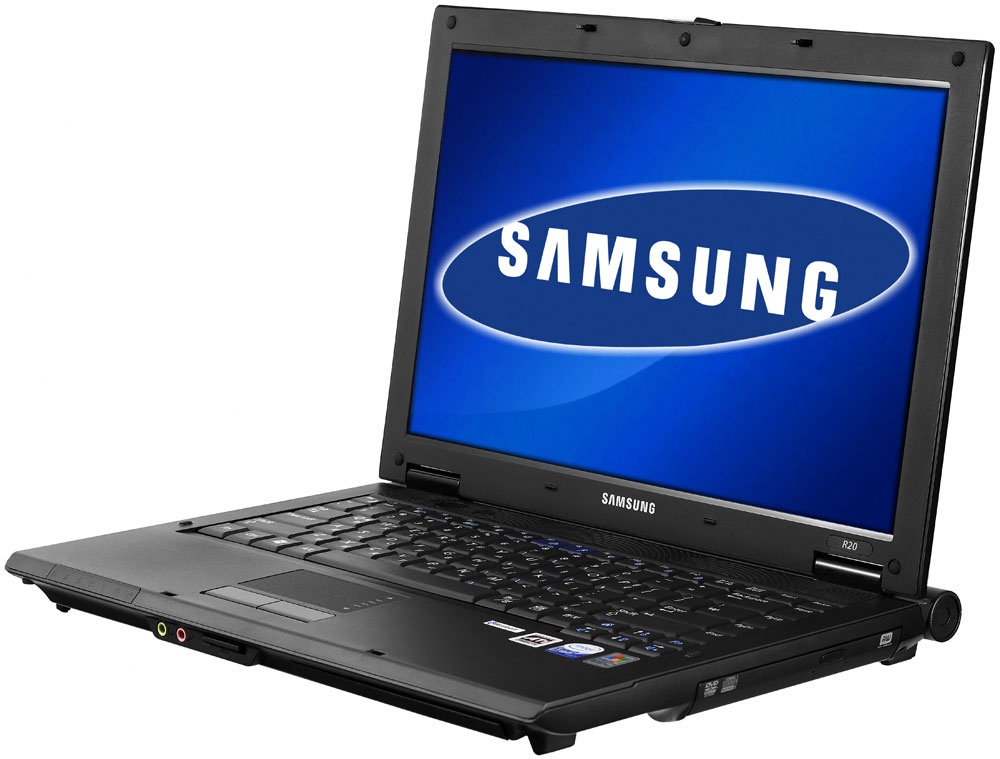
So, today the UPS man dropped off my new laptop and I started to play around with it. This is really one fine machine:

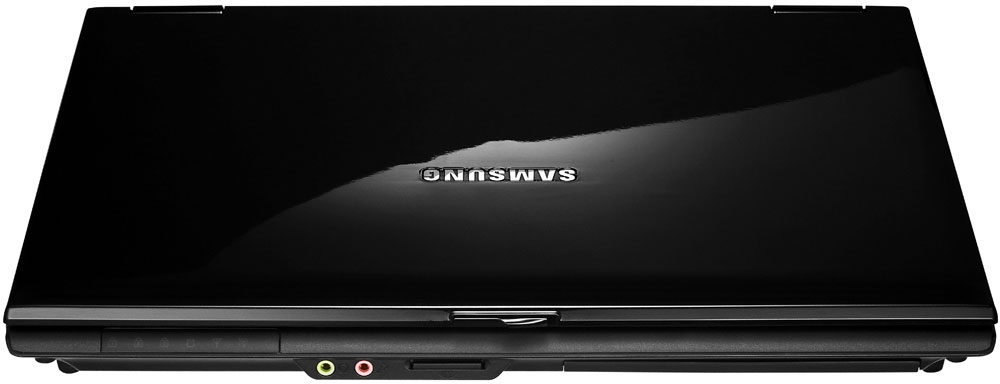
1. It looks terrific with the black piano finish on top (I hope that I can keep it from getting majorly scratched by using a tucano second skin, which is like a diver suit, neopren, fitting the laptop like a glove)

2. The display is nice…1280×800…more than enough screen real-estate for my needs

3. It’s light (2.39kg)…

4. It’s fast (I didn’t grab a screenshot of the windows performance ranking, but the lowest score is 3.8 on 3D, everything else is well above 4 (4.6, 4.8, etc)), I like! High-five!

5. Battery life could be better…it ships with a 4 cell battery so the actual runtime is somewhat limited (roughly 3h)…maybe I’ll get the highcapacity battery (double capacity, 8 cells) in the future…for now, I’m fine though as it’s not going to be “on the road” (without a power outlet in reach) for an extended period of time…

So…I’m exited and looking forward to using this bad boy to do some (semi)mobile writing and playing in the months (and/or years) to come :-)

New laptop selected, ordered and shipped

I finally ordered my new laptop today. I was looking around for months now and it seemed that I just couldn’t find “the” perfect model. My requirements were:

1. max 14.1″ screen…15.4″ screens are fine, but having a 15.4″ screen means that the things is at least 16.x” wide (15.4″ + frame)…usually models sporting a 15.4″ screen are heavy (around 3+ kg)…and due to the big screen the battery runtime is usually low(er) too…

2. decent vga…integrated intel and stuff is cool, but not really…especially as I tend to hold on to laptops for quite some time (I bought my current laptop, an IBM Thinkpad, 6 years ago), so it should be at least up to par now so that’ll still be “okay” in a few years…

3. at least 1GB of ram…better 2GB…dual channel…yadda-yadda…

4. don’t care much about hdd size but 80GB would be fine and a DVD burner would be nice too…

5. shipped with Vista

6. not the most expensive one out there

7. service…at least two-year warranty with at pickup service or better…

8. screen resolution of at least 1024×768…but preferred would be some widescreen format (e.g. 1280×800)…

Given those requirements, it was a real hard task to find a compromise between some of them - 14.1″ models are usually far more expensive than 15.4″ models as 15.4″ is the biggest seller these days, so I guess the panel prices are way cheaper. Some models are still only available with Windows XP. Other models have 14″ screens, but only a 1024×768 resolution. Some models are looking good in pictures, but when you touch them in real life, they feel cheap and not really fit for everyday operation. etc etc

To make a long story short, I finally decided to go with the new Samsung R20-Aura line. There are only two models available in that line, so not much to chose from, but they are exactly what I was looking for. The difference between the models (Deva / Declan)? They’re exactly the same…except for the CPU…so chipset, ram, video card, hdd, dvd burner, software, everything is the same…

Deva - Core 2 Duo T7200 (2×2GHz, 4MB Cache)

Declan - Core Duo T2350 (2×1.86GHz, 2MB Cache)

Now, I always want to go with the newest stuff and all and a Core 2 Duo system would be nice, but I decided to go with the Core Duo model. Why? Let me explain…

Yeah, Core Duo isn’t the current line of Intel mobile processors, but it’s a kickass CPU and probably more CPU power than I’ll ever use (as this notebook will be used as a mobile computer, not as a desktop replacement) and you just can’t beat the price difference. I ordered it with 2GB of ram, 120GB HDD, DVD burner, Vista Home Premium, the whole shebang…and what’s the price difference between the two models (which are exactly the same minus the CPU)? 400 Euro (that’s roughly 545$)…you can keep your 2 between the Core and Duo for that fellows

…the best thing is that I ordered it this afternoon and they called me up five minutes after I had placed my order to confirm everything. The said it would be shipped tonight and earlier on I received a mail with the UPS tracking code…wheee…it really left their shop tonight and now, in the middle of the night, I just rolled into the UPS depot for my area…so…I expect to be playing on and with it tomorrow…the excitement

Specs:

T2350 - 1.86GHz Core Duo

2GB Ram

Ati x1250 video card (max 256MB, which will leave me with 1.79GB of ram)

120GB HDD

DVD-Burner

Vista HomePremium

14.1″ Widescreen WXGA screen (1280×800)

Piano-style finish (shiny black)

Hunt for a new notebook

I’ve been in the hunt for a new notebook for ages now and I’m finally getting tired of it. There are just so many models to chose from and it seems that “the perfect one” just isn’t out there, or at least I can’t find it.

If it got everything I want (nice screen, at least 1GB ram, DVD burner, 80GB HDD, Windows Vista), it’s battery life sucks - how come that a NEW super-duper notebook with kickass technology has a battery life of 2 hours?! Are you serious…my 6 year old notebook used to run that long…sigh.

Then again, if the battery life is awesome, something else just doesn’t seem right. Sigh.

This is really getting annoying and I think I finally settled on a model. 14.1″ WXGA (1280×800) seems the perfect match for me as I don’t like the cloggy 15,4″+ screen models…either I want a notebook or a desktop-replacement…and I don’t see myself hauling a 15,4″ notebook around. Downside: 14.1″ WXGA screens are not the norm (which would be 15,4″ these days) and so those models are usually quite expensive. Sigh. So I had a long look around all the different models and I ended up with the Samsung R20-Aura line. Now the only question left is…go with the highend (2×2GHz Core 2 Duo) or subtract a little cpu power and 1GB of ram (same chipset, same mobo, same DVD, same hdd, but 2×1.83GHz Core Duo) and save 500 Euro…decisions, decisions. I’m leaning toward the Core Duo model though…yes, it’s not the latest cpu, but hey, it’s more computing power than imagine myself using on the road anyway and saving 500 Euro, seems like a good thing to do…

Now I only need to wait for the Samsung people to get back to me as the specs are screwed up on their sites and flyers…one is saying that the CPU is 2×2.16GHz, which can’t be right, but no shame in asking, same goes for the battery…there’s a normal battery (38,48Wh) and a longlife battery (76,96Wh)…but there’s no mention about which battery is included? The normal one, the highcapacity one, both? I guess I’ll find out soon enough if their email-support get’s their behinds into gear…

Vista upgrade done

Well, it’s not really an upgrade, it’s more like a switch as the upgrade process didn’t work (see here). So, I did a complete backup of my system partition and fire up the install. Surprisingly enough, it worked like a charm and the system was up and running in less than two hours. The only bad thing with this “clean install” is that I had to reinstall all the programs. Oh well…now that it’s done, it’s done and it feels good to have this whole thing up and running - probably a better idea than to hop around hoping for the upgrade to work and spending hour after hour with it.

The only thing that’s bothering me: Why does a clean install work like a charm when the upgrade process doesn’t? I mean, I didn’t install anything different or anything, no hardware or software change (as I installed exactly the same stuff that was on it before with Windows XP Pro)…weird…

So…my initial review of Windows Vista Business:

  1. Look and feel: sweet…although it’s a matter of taste…do you really need all the transparency and stuff? The answer is quite simple: not really. But if you’ve got the resources (e.g. CPU, ram, video card) anyway, why not…
  2. Performance: Everything is running smoothly, although Vista gave my video card (nvidia onboard model) only a 2.5 (which is rather low end on the performance scale). Everything else is way up there though (X2 3800+, 2GB ram, SATA HDD, …, especially since I added another gig of ram today gotta love that the price of DDR2 ram dropped by a third since december (back then around 90 Euro/GB, now 60 Euro/GB).
  3. Sidebar: I love it and the widgets errm gadgets are sweet…I especially like the multi-meter and the weather gadget so far…
  4. Compatibility: Well, after installing program after program I gotta say that most of the stuff I usually have on my pc is running fine. The only downside so far was that I couldn’t install divx as it doesn’t support Vista (yet), that’s a bummer.
  5. Sure? Sure? Sure? Click! Click! Click! This is one of the most annoying things I’ve ever seen. Why oh why do you ask me again and again if I want to do x? Hello, I’m an admin here, I told you to do so…so get off my back - I guess I need to search around a little to figure out if there’s a way to circumvent and/or disable this whole question/answer thing…
  6. Startup time: A little slower than Windows XP Pro, but not all that much (I would say around 10-20% slower).

Screenshot

Windows Vista upgrade nightmare

So…as you already know I received my (upgrade) copy of Windows Vista (Business) this week…today, I tried to do the upgrade…so…backup all important files and do the upgrade boogy…

1.5h later…almost done….BSOD….reboot…options: Restore XP…errm?! Okay….

1h later…rollback done…check dump file…ntfs stop message…hmm…

0.5h later…search and search and search….nothing to be found about the particular stop code in relation to Win XP or Vista or an upgrade to Vista…nice, not!

1h later…do the whole checkdisk shebang and all…uninstall some software and stuff…try again….

1.5h later…upgrade almost done….BSOD…reboot… options: Restore XP…errm?! Okay….

1h later…rollback done…check dump file…ntfs stop message…hmm…

Curse, curse, explicit, curse, curse…

Who the hell designed that upgrade process? If there’s an error during the upgrade, why the hell is the only option a rollback? Why can’t I select, please try again using setting x, y or z? No, I need to do the whole rollback and I’m back at square one…what a joke.

So…all that’s left to try is:

1. Do an image of the current install…

2. Do a clean install of Vista…

3. Pray and hope…

4.* Install the whole software shebang again, because the stupid upgrade didn’t work…

5.* Enjoy Vista…

* - if 3. helps and the setup works this time…so sick…

Windows Vista delivered

Wheeeee…..the excitement. Finally got my copy delivered today. Had no time to do the backup shenanigan, so I didn’t install it right away. I’ll probably get to it over the long easter weeked…can’t wait to see the whole sidebar and all…I’ll be back with some screenshots once I’ve installed it…

Vista shipped

Finally some good news from the “upgrade nightmare” front. Finally, finally, they shipped my upgrade copy of Vista Business on tuesday (so basically just on the day I ranted about them not shipping it, lol, did they read my blog?! )…now it should be only a matter of a few days until I hold it in my hands, the excitement

Letting go…

I’m usually a “collector” type of guy, but it’s time to let go. Last week I decided that I would let go of my proxy network (browsetastic.com) and put it up for sale at the MarketPlace of the great SitePoint Forums, where I’m an advisor (moderator).

Although the number of inquiries was huge, the number of bids was little…at least in the beginning. Then, it happened pretty quickly. After I posted a BIN, it was sold within 24hours…which leads me to believe that the BIN (12x net monthly revenue) was a little low, but hey, I’m not the type of guy who’s whining afterwards. I’m happy that I sold it at the price I did and all that’s left is to wait for the money to roll in and then getting everything setup to make the transfer smooth and easy…

…and on the upside, I’ve still got more than 40 sites to my name, so I’m not really retiring from the website business…and with the cash raised in the sale, I’ll get myself a new laptop (among other things) which will be put to good use in my upcoming diploma thesis…

Waiting for Vista

Man, this really sucks. Now, I’m usually not the one to jump on the train right away anyway, so it’s basically not the biggest deal, but slowly I’m getting annoyed. Why? Because I ordered a WinXP license with an upgrade coupon back in december when I built my new pc. So far so good. I then sent the upgrade coupon to Modus Link (the company handling the upgrades). That was in the first week of January. Since then I’m waiting and waiting and waiting…

Today, I checked the status again and the upgrade claim has finally been approved. Well, that’s the first step, but the thing still isn’t shipped yet. Are you kidding me? Three months and you’re unable to send me a dvd with a license sticker? Hello?! Absolutely ridiculous! The only upside: by the time I receive my copy I can be absolutely sure that there are drivers for everything in my pc and on a funny note: maybe SP1 will be already out by then

iPhone

Wow…just had the chance to watch the stream of Steve Jobs’ keynote…

iPhone - I want one…end of story.

iPhone

Source: Apple Inc.

End of the year, time for some upgrades

Well, it’s been a while since I last upgraded my pc…almost 3 years…

So, I decided it’s time for a new one…some funky dual core stuff or something and yup, there are lots of possible configurations.

First decision: Intel or AMD?

I know that Intel’s Core 2 Duos are powerful, fast and sexy…but they’re a little more expensive too…so I thought I’d go with AMD, yet again…(my current system is an AMD Athlon XP, the one before that was an AMD, …

Second decision: Fastest/expensive, medium/alrighty, lower end/cheap

I decided to go with middle ground…an AMD x2 3800 it is, the Energy Efficient version of it - that’s perfect for a smaller case and it’ll help me save some energy costs, after all my pc is running most of the time. Combined with a funky mATX board, 1GB of ram (for now), 500GB Samsung SATAII (16MB Cache), DVD-burner, DVD-Rom and a nice mATX case by aplus…

aplus blockbuster

The case arrived today and I’m hoping that the rest will arrive tomorrow (it was sent off by the shop today)…it’s going to be fun to build a pc, haven’t done that in a while…

Ooooh and I almost forgot, I ordered a new copy of Windows XP Pro…117€ including an Express upgrade coupon to Vista business….sounds like a good deal

I’ll post some pics once I’m done building…

Postchristmas update

So much to report, so little time. It’s been a while since my last decent post, but don’t worry…everything is fine, although I tend to not find the time to post in recent days. So, what else is new?

The new server

This blog along with some other sites is still hosted by dreamhost, but sites are being moved to my new dedicated server piece by piece. As mentioned in my Nov 25th roundup I just had to get myself a new dedicated server as the low-end AMD Sempron just didn’t cut it, especially due to the “low bandwidth deal” I had on that server (”only” 200GB). So I ordered an Opteron beast, but they couldn’t deliver it right away so I was stuck. After a lot of haggling with the technical support I got an interim server (AMD Athlon 64) free of charge until my real server would be ready. Happy news: the server was finally shipped and installed in the ISP’s datacenter on December 24th…! It took me a while to set it up with all the domains, DNS, mail accounts, etc etc but I got the job done.

Tech Specs:

  • AMD Opteron 146, 64bit server cpu
  • 1GB Ram
  • 2×160GB
  • unlimited traffic! (as this is with one of germany’s leading hosters this is a real deal, although unlimited should really be called unmetered as there’s no such thing as unlimited, it’s 100MBit NIC max data rate * days in a given month)
  • 160GB backup space in another data center

I’m running the box on Suse Linux 9.3 with Plesk 7.5 Reloaded, which is really comfortable especially due to the preinstalled Plesk modules (Courier IMAP, both Antivirus + Antispam solution, etc). I tweaked the linux install a little - now I’ve got stuff like apt-get known from debian for easy updating and installing of packages.

As I plan to migrate all the stuff over from all the different hosters one of the first things I thought about was data security - or in other words: BACKUP! So I thought a while of how to accomplish what I really wanted: daily backups of all the home shares, mail accounts, databases and configuration files. I came up with a shell script which will run once every night and which will backup all the stuff, zip it and move it to both the second hdd and the remote backup location (in another data center) automatically via cronjob. This way I’ve got daily backups which will be valid for one week, then they will be overwritten…

Here’s the code:

#!/bin/bash

MYUSER=myLocalUser

MYPASS=myLocalUserPassword

FUSER=remoteDataCenterUser

FPASS=remoteDataCenterPassword

mkdir -p /backup/mysql

WOTAG=`date +%a`

rsync -az –delete –delete-after /home /backup

rsync -az –delete –delete-after /etc /backup

rsync -az –delete –delete-after /var/qmail/mailnames /backup

rsync -az –delete –delete-after /var/www/vhosts /backup

cd /backup/mysql

mysqldump -AaCceQ -u$MYUSER -p$MYPASS -r mysql.dbs

cd /backup

tar cjf etc_dirs.$WOTAG.tar.bz2 etc

tar cjf homedirs.$WOTAG.tar.bz2 home

tar cjf maildirs.$WOTAG.tar.bz2 mailnames

tar cjf vhosts.$WOTAG.tar.bz2 vhosts

tar cjf mysqldbs.$WOTAG.tar.bz2 mysql

cp *.bz2 /mnt/zweite/backup

ftp -u ftp://$FUSER:$FPASS@remoteDataCenterLocation *$WOTAG*

IngoalNetwork

As you may have noticed there’s this whole network bar thing at the top of this blog and at the top of all the other sites which I own…I had the idea to put them all together under “one roof” by creating this network, the network bar and the corresponding website. Today I finally finished the Ingoalnetwork Webpage(s) - IngoalNetwork.com, IngoalNetwork.de - as you may have guessed the .de site is the german version and the .com site is the english version. Both are coded in valid xhtml transitional. I’m especially proud of the lovely AJAX enhanced contact form.
WordPress 2.0
I backed up everything here at Ingoal’s Insight this afternoon, so I’ll continue and upgrade as soon as I’ve finished this post. On another note: I’ve already done two upgrades today and both went really smoothly, so I don’t expect any complications…Update: done, no problems

Firefox 1.5 released

So, after a long wait Firefox 1.5 has been released. You can download it here.

Migration: Painless, although some extensions aren’t 1.5 compatible (most notable my favourite extension SessionSaver), but I guess they’ll be available soon enough…

WordPress.com is open for signups

WordPress.com is open! After working with invites so far, it’s now finally open to signups. So, if you’re looking to setup a WordPress blog without any hassle (not that it’s much of a problem to install WordPress, especially due to the fact that most hosters offer one-click installs these days) and can deal with some restrictions (as far as I can tell you can’t point a domain to your blog, but you will have to stick with the username.wordpress.com domain, as I don’t want to signup just for testing around I can’t say much more about it, but I guess that some other restrictions most certainly apply (plugins, etc)?!), WordPress.com is for you - especially because it’s free (at least for now!)

Next Page »

Bad Behavior has blocked 1018 access attempts in the last 7 days.